
Quick summary
- Cedar AI’s ARMS™ platform lets you define what a team can see and do, and which part of the business that access covers.
- Those decisions carry into other work, including customer access, API integrations, connected AI assistants, and scheduled shipment reports.
- Built-in roles and feature bundles maintained by Cedar AI make detailed permissions easier to manage as the product evolves.
- Groups, directory connections, and a history of access changes help administrators stay up to date with the organization.
Access starts with the work
A local operations team needs to run its part of the business. A regional manager needs visibility across several operations. Accounting needs the information required to close the books. A customer needs access to the work you handle for them.
Signing in confirms who each person is. Authorization determines what happens next: which information they can see and which actions they can take. In everyday terms, it is how you decide who can do what.
For Cedar AI, that decision includes where the responsibility applies. Permission to review billing for one operation is different from permission to review it across the company. Permission to see a record is different from permission to change it.
We build around those distinctions because they reflect how freight businesses work, whether the organization runs railroads, terminals, shipping operations, or a combination of them.
Give each team the access its job requires
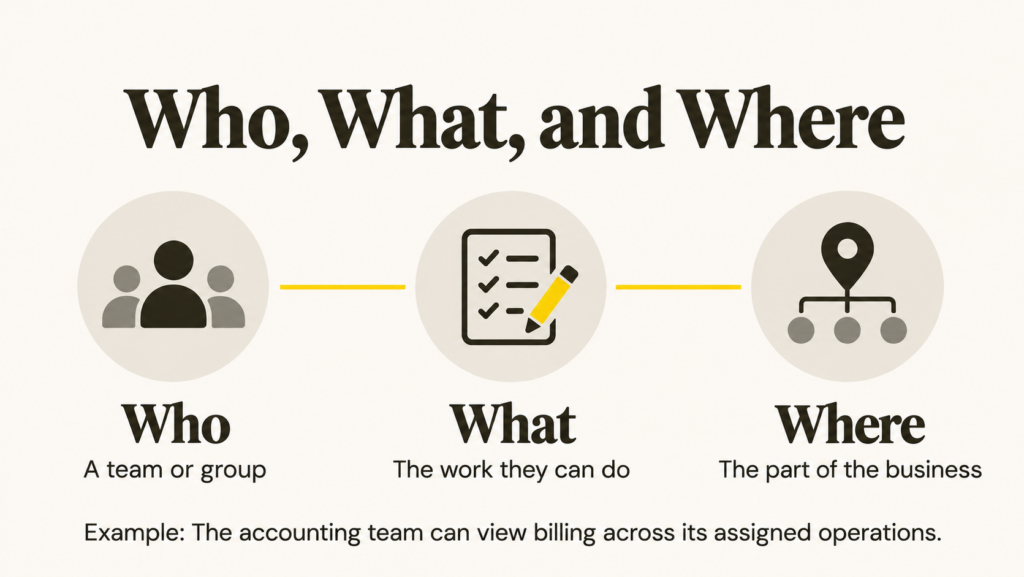
Cedar AI organizes access around groups, roles, and scope. A group identifies the people. A role defines the work they can do. Scope identifies the part of the business where that role applies: an organization, a business unit, a carrier, or a specific customer, location, or grouping.
Consider a company with several operations. Its accounting team could have permission to view billing across the organization, while a local operations team has responsibilities within one operation. A customer group can receive access limited to that customer’s work.
These choices are separate. Giving someone a wider view does not require giving them more authority to make changes. Giving someone permission to perform a task does not require opening every operation to them.
Build roles your administrators can maintain
Cedar AI provides built-in roles for common responsibilities. When a team needs a different combination, administrators can create a custom role.
Cedar AI groups related permissions into feature bundles, with access levels such as View, Operate, and Manage where the feature supports them. Administrators can choose the feature and level their team needs without working through every underlying permission.
Notes offers a simple example. One person may only need to read notes. Another needs to write and edit their own. A designated moderator may need to edit or remove other people’s notes. Those are distinct responsibilities, and Cedar AI supports treating them that way.
Cedar AI maintains the feature bundles as capabilities evolve, and roles built from them inherit those updates. Administrators still choose which bundles belong in each role. Individual permissions remain available when a more specific arrangement is needed. A carefully configured role should remain practical to manage as the software grows. The feature-set guide explains the details.
Carry those decisions into connected work
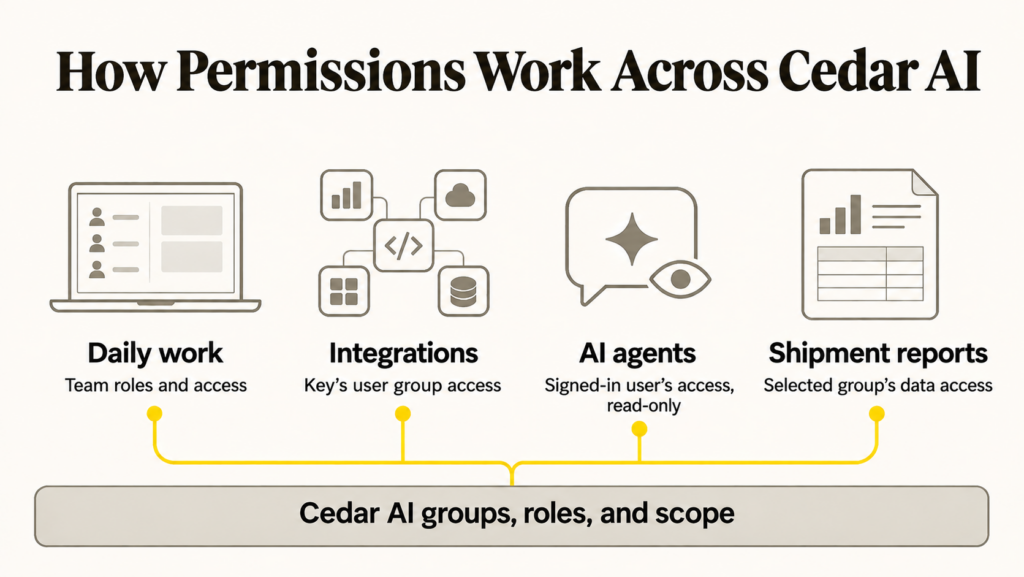
Cedar AI’s permission model is used beyond the application screens. The same groups, roles, and scope also help govern integrations, connected AI assistants, and report generation.
An accounting integration, for example, connects to Cedar AI with an API key tied to one user group. The integration can act only as members of that group and only with that group’s access, and Cedar AI attributes each action to the named person. That person may be a dedicated account set up for the integration, or the employee taking the action in the connected system. Connecting a system does not, by itself, determine everything it may do.
AI agents use this permission model too. MCP, short for Model Context Protocol, is a standard way for AI tools to connect to business software. Cedar AI’s customer MCP connector for ARMS checks requests against the signed-in person’s existing permissions. The agent can retrieve only information that person is allowed to view. The connector is read-only, so it can look up records without changing them. The MCP data handling guide lists what the connector sends and omits.
Reports follow the same pattern. Administrators control who can manage them. Where scheduled shipment reports are available, each one is tied to a selected group: Cedar AI generates the report from that group’s permitted view of the data and delivers it to the group’s current members, plus any outside email addresses the administrator adds.
Let access reflect the organization
Responsibilities often span more than one operation. Cedar AI supports an organization hierarchy, with levels such as regions or business units. Access assigned at a higher level carries through to the operations beneath it.
A regional team can therefore receive the appropriate access across its region without repeating the same assignment for every operation. Local teams can receive narrower access. Once Cedar AI has set up the initial organization, authorized administrators can manage its structure and assignments.
Keep up as people and responsibilities change
Groups let administrators manage shared responsibilities together. When someone joins a team, membership connects them to that group’s assigned roles and scope.
For organizations using SCIM, the directory connection covered in our sign-in article can synchronize group memberships from the company’s central employee directory. The directory maintains membership. The roles and scope configured in Cedar AI determine what that membership allows.
Administrators also need to understand changes after they happen. Cedar AI’s activity log records changes to access settings, including who made the change, what changed, and when. That gives the team a history to consult when reviewing access or investigating why someone’s experience changed. The activity log guide shows what each entry includes.
Administrators can also view Cedar AI the way a group sees it, to confirm what a team or customer will be able to see before or after a change. And when building a role, the role editor shows where each permission comes from, whether a feature bundle or an individual addition.
Make precise access workable every day
Precise access gets tested in ordinary situations: a team with responsibilities across several operations, a customer report with a defined audience, an integration with a specific job, or a role that has to keep working as features develop. Cedar AI builds its permissions to handle those situations with the same groups, roles, and scope. Detailed control is more useful when one setup serves all of them and administrators can maintain it over time.
Frequently asked questions
What’s the difference between sign-in and permissions in rail software?
Sign-in confirms who a person is. Permissions decide what that person can see and do once they’re in. In ARMS, those are separate decisions, so a confirmed user still only reaches the work their role covers.
How does ARMS organize user permissions?
Around three things: groups, roles, and scope. Groups set who, roles set what work they can do, and scope sets where it applies, such as an organization, business unit, carrier, or a specific customer, location, or grouping.
Can someone see more of the business without being able to change more?
Yes. Viewing a record and changing it are separate permissions. A wider view doesn’t require more authority to make changes, and permission for one task doesn’t open every operation.
Does ARMS come with built-in roles?
Yes. Cedar AI maintains built-in roles, and administrators can create their own roles for other combinations of access.
What are feature bundles in ARMS?
Feature bundles group related permissions, with access levels such as View, Operate, and Manage where supported. Built-in bundles update as ARMS capabilities change, and roles built from them inherit those updates. Individual permissions are still available when a role needs something specific.
How do permissions apply to API integrations?
Each API key is tied to one user group. The integration acts only with that group’s access, and its actions are attributed to a named person, either a dedicated integration account or the employee taking the action.
Can an AI assistant connected to ARMS see more than the user can?
No. The ARMS MCP connector checks each request against the signed-in person’s existing permissions. It is read-only and can only retrieve information that person is allowed to view.
How do scheduled shipment reports respect permissions?
Each scheduled shipment report is tied to a group and generated from that group’s permitted view. It goes to the group’s current members plus any outside email addresses an administrator adds. Availability varies.
Does ARMS support regional or business unit hierarchies?
Yes. Access assigned at a higher level, such as a region or business unit, flows to the operations beneath it. Local teams can receive narrower access, and authorized administrators manage the structure after initial setup.
Can ARMS sync user groups from our company directory?
Yes, with SCIM. Your directory manages group membership, and the roles and scope in ARMS decide what that membership allows.
How can administrators audit access changes in ARMS?
The activity log records who changed access settings, what changed, and when. Administrators can also view ARMS as a group sees it, and the role editor shows whether each permission comes from a bundle or an individual addition.
Want to talk through how your teams, customers, and connected systems should work together? Talk with Cedar AI.